Google
 
Add to Technorati Favorites architect studio
Showing posts with label sketchup tutorial. Show all posts

Tuesday, April 05, 2011

Water color effect, by Heterarchy Ltd


If you get bored of the SketchUp default effects, you can try this sketchy yet presentable effect by Heterarchy Ltd, it looks like watercolor effect, very soft, and feeling comfortable.

You can achieve it in 2 ways, either going to built-in plugin where is available from the top menu in window > styles >, there are few options that you can play with, and of course it is able to edit to your preferences, but some mapping you may need to do it in photoshop.

Or

Touch-up in photoshop after exporting from your SketchUp, you may need some photoshop skills.

For me, I would prefer using built-in effect because it would save you a lot of time in photoshop if you have a lot of images to present, however, if you only have few nice images to show, please do not hesitate to do it in photoshop, it is a very powerful tools to enhance your presentation style and overall effect.

Have fun!

Images © Heterarchy Ltd
via

Wednesday, February 23, 2011

How to divide a line or arc into equal segments?


It is so embarrassed telling the truth here, although I have been using sketchUp for quite a long time, but recently just noticed that it's a very useful command, which is to divide a line or arc into equal segments.

So, from now on, I can throw my calculator away from and desk and say bye bye.

Here is the demonstration step by step. Let's feel free to test it out.
  1. First, you need to right click on the line or arc to display the menu (blue arrow, click on the "divide"), 
  2. you will see some red-spots, moving left-right or key in the number of segments you would like to have.
  3. Draw lines to split the surface.
That's it, easy huh...


Monday, May 04, 2009

Sketch up video: How to create for Google Earth 3D modeling

How to create for Google Earth 3D modeling... I believe some of you are expert in modeling sketch up for Google Earth, but some are not, if you are the one who is new to this field, please click the link for your practice.

Besides, in Google sketch up tutorial site, it ranges from basic to advanced topic, which include,

1) Beginner
2) Intermediate level
3) Expert level
4) Working with Google earth
4) Creating layout for presentation

Friday, March 27, 2009

How to draw egg in Sketch up?

"How to draw an egg?" is an interesting question that I received recently, I've done a demonstration and post it here to help those don't know how to draw an egg in sketchup.

First, you need to draw an 2D egg shape by using "arc" tool, then draw a circle which control the size of the egg, put it at the center of egg shape. Now you can use the "follow me" command to build your egg.

Have fun!

Thursday, February 12, 2009

Sketchy effect, by BEHNISCH archietcts

Anting New Town Sports Complex

Millenium Biologix - Headquarters & Research Facilities

I like Behnisch archietcts's presentation style, because the way they present their works is very clean and sketchy.

Millenium Biologix
proposal, one of the Sketchy model, the effect can be achieved by extending the edge lines which can be set in the 'Edge style - extension' option.

Images © Behnisch archietcts

Monday, December 22, 2008

SketchUp component compatibility

"I am using sketchup 4, but most of the components in Google warehouse are in sketchup 6 version, it would be appreciated if you send me the sketchUp 4 version component to my email xxx@gmail.com."

"where can I get older version of sketch Up component?"

"I am very hard to find sketch Up 4 components from internet, can you send me some link to refer? thanks so much."
Recently I've received a lot of queries of the sketchup component compatibility, we know after Google bought over the sketch up software, it seems to us a frequent launching 3D software, a lot of older version user, cant really find a suitable component.

Today, I just wanna have a post of helping you guys for the component compatibility issue. I have always featured the Google 3D warehouse in my previous post, no worries, lets see the picture below, what do you think?


yea... you are right, if you are sketch up 3, 4 or 5 users, please go the google sketch Up page to download a free sketchup 6 or 7, then you can open the component in where you have downloaded from if the component is not in 4 version, and save it as [sketch up 3] , [sketch up 4] or [sketch up 5], it depends on what kind of version you are currently using. Done! you can now insert your saved component to your older sketchup version. Easy, isn't it?

please click here to download a latest sketch up version.

Sunday, December 07, 2008

SketchUp video tutorial

As promised, I've found additional SketchUp tutorial videos. I think these SketchUp tutorial videos are very helpful for those are new to SketchUp. The tutorial video featuring how to apply the texture to the model, how the components work, how to create terrains from contour, how to build model from a photo and etc.

Please click here for more your enjoyment.

Friday, October 03, 2008

Soap Skin & Bubble, Tensile Structures for Sketchup

Archdaily has a post regarding how the sketchup does the flexible form, for instance, before, we can actually only use sketch up to build simple form, but NOW...Tensile-structures has launched a plug-in associated with sketchup that enable the program to build a better and flexible form as samples below.

You can go the their website to download the sketch up plug-in for free! and also the video tutorials and demonstration all are available in YOUTUBE.

Tensile Structures for Sketchup (image © http://www.tensile-structures.de)

Soap Skin & Bubble (image © http://www.tensile-structures.de)

Friday, August 22, 2008

Podium 1.5 working in Sketch Up

image © Christ Haseldonckx, a.k.a.‘biebel’

SU Podium is a photo-realistic rendering plug-in for Google SketchUp 6. Now, you can run a TRUE photo-realistic effect rendering program from your sketch up model without going through too many complex processes.

"Podium runs completely inside Google SketchUp from start to finish. It uses SketchUp features such as textures, background colors, groups and shadows to achieve impressive results. Podium is intuitive to SketchUp users."

Here are a free evaluation version to download and play with it, no expiry. Some more this version is exactly the same as commercial version just only the smaller outputs (320x120, 500x500 image resolution). Before doing anything, let's browse through the video tutorial for your better familiar with the program.

Saturday, June 28, 2008

Google 3D Basecamp 2008, YouTube

Google 3D Basecamp 2008 video presentations are available on YourTube


SketchUp and AutoCAD
How to create a base-plan quickly and effectively, the relationship between AutoCAD blocks and layers with SketchUp components and layers, it would save all your time.


SketchUp and ArchiCAD
This video talks about the connection between SketchUp and ArchiCAD, describing the "BIM -building information modeling", as called "vitual building".


Promoting Your Work Using Google Resources
There are some architectural design case studies, majority to demonstrate how we can maximize using the Google resources.


Maxing Out Your Productivity with Ruby Scripts
How Ruby Scripts relate to SketchUp program.


SketchUp and Green Design
Does SketchUp relates to Green Design? Let's see...


Adding detail with the follow-me tool
A shape follows path, the video is also demonstrating the modeling shortcut method.


Marking Your Mark with SketchUp

Tuesday, June 03, 2008

Sketch up in light and shadow


You can even have a better Sketchup animation with the V-Ray plugin support. V-Ray is a rendering plug-in that enables Sketch-Up users to have a performance enhancements for producing an outstanding image quality. The renders using these V-Ray technique can appear more photo-realistic to the human eye, as actual lighting effects are more realistically emulated.

This is the sample of how the Sketchup output associated with V-Ray.

Saturday, May 10, 2008

Google 3D Warehouse

Google 3D warehouse serves as a sharing platform for the sketch up users to publish and share your works. The 3D model has been categoried into 2 types: geo-referenced and non-geo-referenced. The geo-referenced is a real building object which has been built and located in Google Earth, and the non-geo-referenced is just the supporting 3D model like car, people, tree & etc....

There are some helpful modeling guideline (pdf format) for your better understand how to apply a new texture/material to the model (including the tutorial in Photoshop).

Wednesday, May 07, 2008

Sketch-up animation video

Sketch up is not only for paper presentaion, but also the animation, allow to create a fly through video. In the video, we can see how the 2D (plan) turns to 3D (form), and the 3D comes to animation (doors open & close).

Thursday, April 10, 2008

Sketch design, 2D + 3D

The presentation of sketch elevation design in sketch up with the CAD lines (both elevation and plan) which are laid in layers vertically and horizontally as shown in picture. It looks pretty cool right....

Thursday, January 24, 2008

Sketch up video tutorial

Interest video demostrates the process of building a building using the sketch up, it is fun !

Wednesday, December 12, 2007

How to generate a twisting form by sketch up?


One asked how to build a twisting form in sketchup, let's start with a simple form for your experiment and better understanding, here we go...

First, after building the form as shown in picture, then select only the top surface and rotate it, the twisting form will be automatically generated... try it out!

Saturday, December 08, 2007

sketch up effect with a lightlight color

car showroom proposal

Here is the sample of creating the sketch up effect with a lightlighting color that expressing your architectural ideas. This features can be colored in photoshop or even in sketch-up before exporting to Jpeg file.

Saturday, August 04, 2007

Video sketchup Tutorials

Google offers video sketch up tutorial to improve your sketch up skill, these videos demostrate


If you are still sketch up 5 user, and looking for tutorial, here are some video informations that meet your needs.

Tuesday, June 05, 2007

create a simple background in sketch up

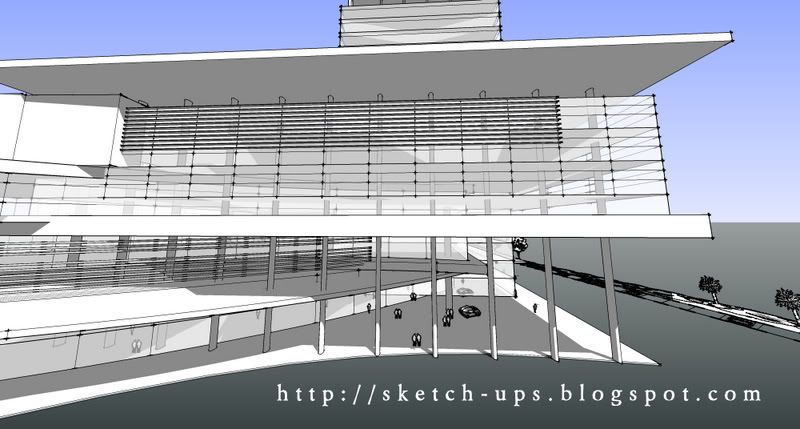
You can just create a simple background in sketch up like what other 3D softwares do, here are the sample of creating a background with black & white effect (hidden line, endpoints = 5).

the background: window > model info > 'table below'


Tuesday, January 16, 2007

3 effects in 1


This is another method of presentation for your sketch up,

3 effects in 1 (can be more than 3 if you want to)

  • wireframe
  • hidden line (Jitter)
  • shared with textured (Jitter)
* touched up in photoshop for joining them together

Recent Up-date